
Create your own climb profile from a GPX file
This is not a catalog of existing climbs: upload your own ride, keep the section you care about and download an image of your ascent, segment by segment, colored by gradient.
Trim the track
Move the two handles to keep only the climb you are interested in.
How it works
- Upload your own GPX file (bike ride, run or hike) exported from your GPS device or app. No need to look for the climb in a catalog.
- Use the two handles to keep only the climb you want, instead of the whole ride.
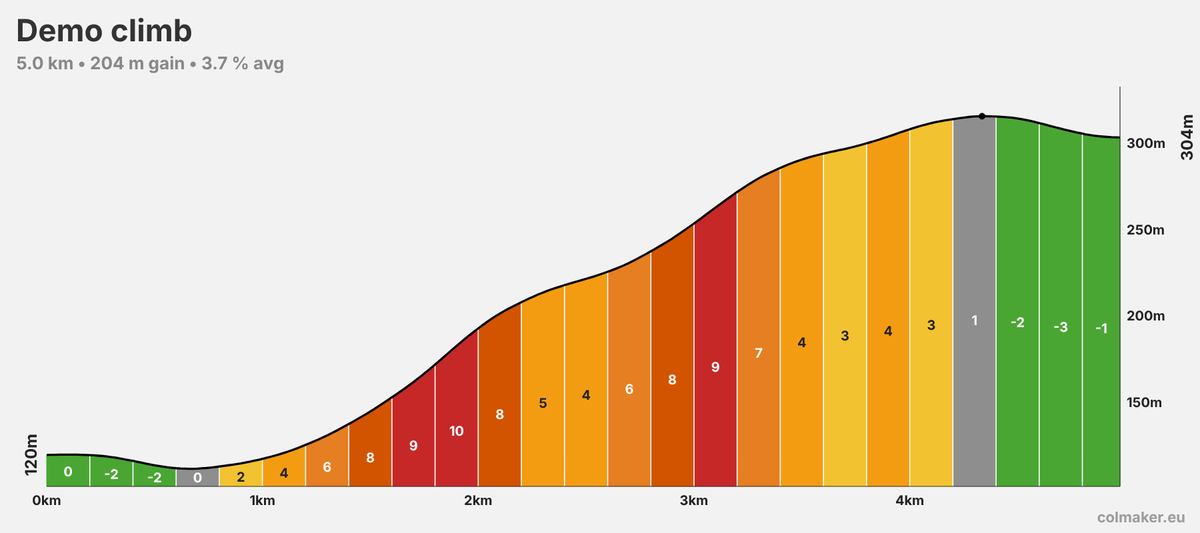
- Download the PNG image: the ascent is split into 200 m segments, each colored by its gradient and labeled with its percentage.
The image shows the distance, elevation gain and average gradient of the selected portion, one color per segment from green (descent) to black (11% and above) with a legend, the start and end elevation, and the highest point of the profile.
Colmaker Pro is coming
The basic rendering stays free. Pro adds customization:
- Segments from 50 m to 1 km
- Preset palettes or colors picked gradient by gradient
- Custom title
- HD, square or portrait images
- Image without watermark
It is not on sale yet. Email us if you are interested and we will let you know at launch.
Notify me by emailNo email app set up? Write to info@colmaker.eu
Frequently asked questions
Is the tool free?
Yes. Creating and downloading the image is free, with no account, and carries a small discreet watermark in the bottom right corner. A Pro version is in the works: segment length, custom palettes and colors, custom title, HD, square or portrait images, and no watermark. Interested? Email info@colmaker.eu.
How is this different from sites that list existing climbs?
Climb catalogs show ascents that are already known. Here you create the profile yourself: you start from your own GPX track, so you can draw a climb that is missing from catalogs, a trail, a race course or simply a section of your ride.
Is my GPX file uploaded to a server?
No. The file is read and processed directly in your browser. Nothing is sent or stored, so your GPS tracks stay with you.
Which files are supported?
GPX files that contain elevation for each point, up to 10 MB, whether it is a recorded track or a planned route. Without elevation data the profile cannot be computed.
How is the gradient calculated?
Elevation is first smoothed to reduce GPS noise. The track is then split into 200 m segments, and each segment's gradient is its elevation change divided by its length. The average gradient shown is the net elevation difference between start and finish divided by the distance.
Can I keep just one climb from a long ride?
Yes. After the upload, an overview of the whole ride appears with two handles: move them to select the climb and the image updates live.